Centralized Training Architecture
Last Updated by Gil Ninveh on February 3rd, 2026.
Overview
In this document, we outline the requirements for our Centralized Training solution.
To facilitate centralized training, our system utilizes the Edgify agent installed on each edge device for data capture. During the day, through normal use of the SCOs / lanes / self-service-scales, the agent captures images/videos. Overnight, this data is uploaded to the Edgify cloud and deleted from the edge devices periodically.
Using this image/video data from the stores, we train our AI models and deploy these back to the edge devices, where they are utilised by the Edgify agent to detect and prevent loss at the point of sale (for Loss Prevention use solutions) or recognize products (for barcode-less items recognition solutions).
Diagram
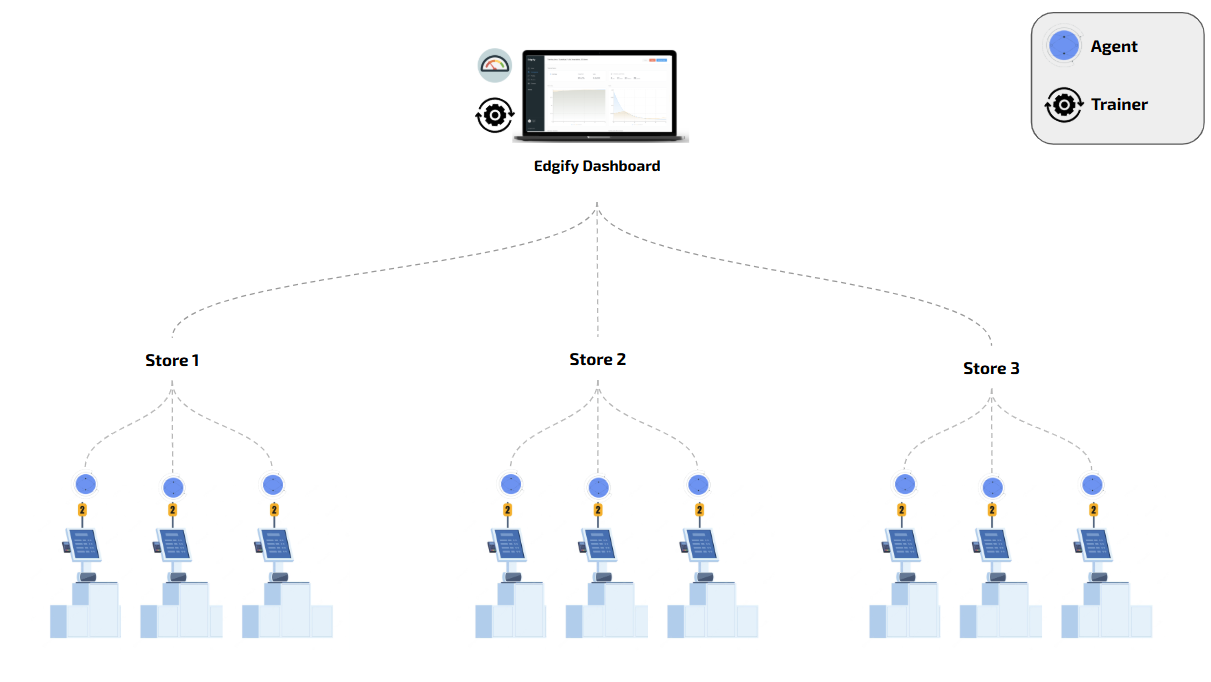
Loss Prevention - Data Center Architecture
Edge Device Minimum Requirements
| Parameter | Min Spec | Comments |
|---|---|---|
| OS | Linux Ubuntu 20.04 (or above) / Windows 10 64 bit (or above) | |
| Available Storage | 5 GB | |
| Available CPU (or above) | i5 Quad Core Gen 6 with GPU support (or above) | We need about 50% of this cpu (two of the 4 cores) |
| Available Ram (or above) | 4 GB Free | |
| Network internal LAN (or above) | 100Mbps | |
| Network external WAN | 10Mbps |
Edgibox Minimum Requirements
The minimum requirements for implementation of an Edgibox will vary based on customer's requirements and intended usage.
Please consult with one of Sales Engineer for additional information
Network Ports Considerations
Edge Device Ports
| Port | Direction | Source | Destination | Notes |
|---|---|---|---|---|
| TCP 443 (HTTPS) | Outbound | Edge Devices on the store network | Edgify’s Dashboard (35.186.251.17) | Edgify’s Dashboard |
| TCP 443 (HTTPS) | Outbound | Edge Devices on the store network | Edgify’s Docker Container Repository (For Linux Devices) | |
| TCP 22 (SSH) | Inbound | Remote access method (VPN, jump-server, etc.) | Edgify devices on the store network | Edgify Agent maintenance |
| TCP 8090 (REST) | Outbound | Edgify devices on the store network | Edgibox | Saving images |
Edgibox Ports at the datacenter
| Port | Direction | Source | Destination | Notes |
|---|---|---|---|---|
| TCP 443 (HTTPS) | Outbound | Edge Devices on the store network | Edgify’s Dashboard (35.186.251.17) | Edgify’s Dashboard |
| TCP 443 (HTTPS) | Outbound | Edge Devices on the store network | Edgify’s Docker Container Repository | |
| TCP 22 (SSH) | Inbound | Remote access method (VPN, jump-server, etc.) | Edgify devices on the store network | Edgify Agent maintenance |
| TCP 8090 (REST) | Outbound | REdgify devices on the store network | Edgibox | Saving images |
BLIR - Data Center Architecture
Edge Device Minimum Requirements
| Parameter | Min Spec | Comments |
|---|---|---|
| OS | Linux Ubuntu 20.04 (or above) / Windows 7 64 bit (or above) | |
| Available Storage | 5 GB | |
| Available CPU (or above) | Celeron Dual Core (or above) | We need about 50% of this cpu (one core of the dual cores) |
| Available Ram (or above) | 2 GB Free | |
| Network internal LAN (or above) | 100Mbps | |
| Network external WAN | 10Mbps |
Edgibox Minimum Requirements
The minimum requirements for implementation of an Edgibox will vary based on customer's requirements and intended usage.
Please consult with one of Sales Engineer for additional information